Clean filenames, no duplicates, done in minutes.
Select multiple statements, download them all at once, and auto-rename into tidy filenames by bank, year, and month. No spreadsheets, no messy "Statement(12).pdf".
How It Works
Get started in minutes. No complex setup required.
Log into your bank's official website
Access your account as you normally would
Navigate to your statements page
Go to the statements or documents section
Click the extension icon
Open Batch Statement Downloader from your browser toolbar
Select the statements you want
Use checkboxes to choose multiple statements
Download everything in one click
All selected statements download automatically
Optional: Turn on Smart Renaming to automatically organize your files.
Organize Every Statement Automatically
Turn messy downloads into clean, searchable files automatically.
No more "Statement(12).pdf" — just organized, professional filenames.
- ✓Rename by bank, year, month
- ✓Custom naming templates
- ✓Preview before downloading
Install in seconds. No account required.
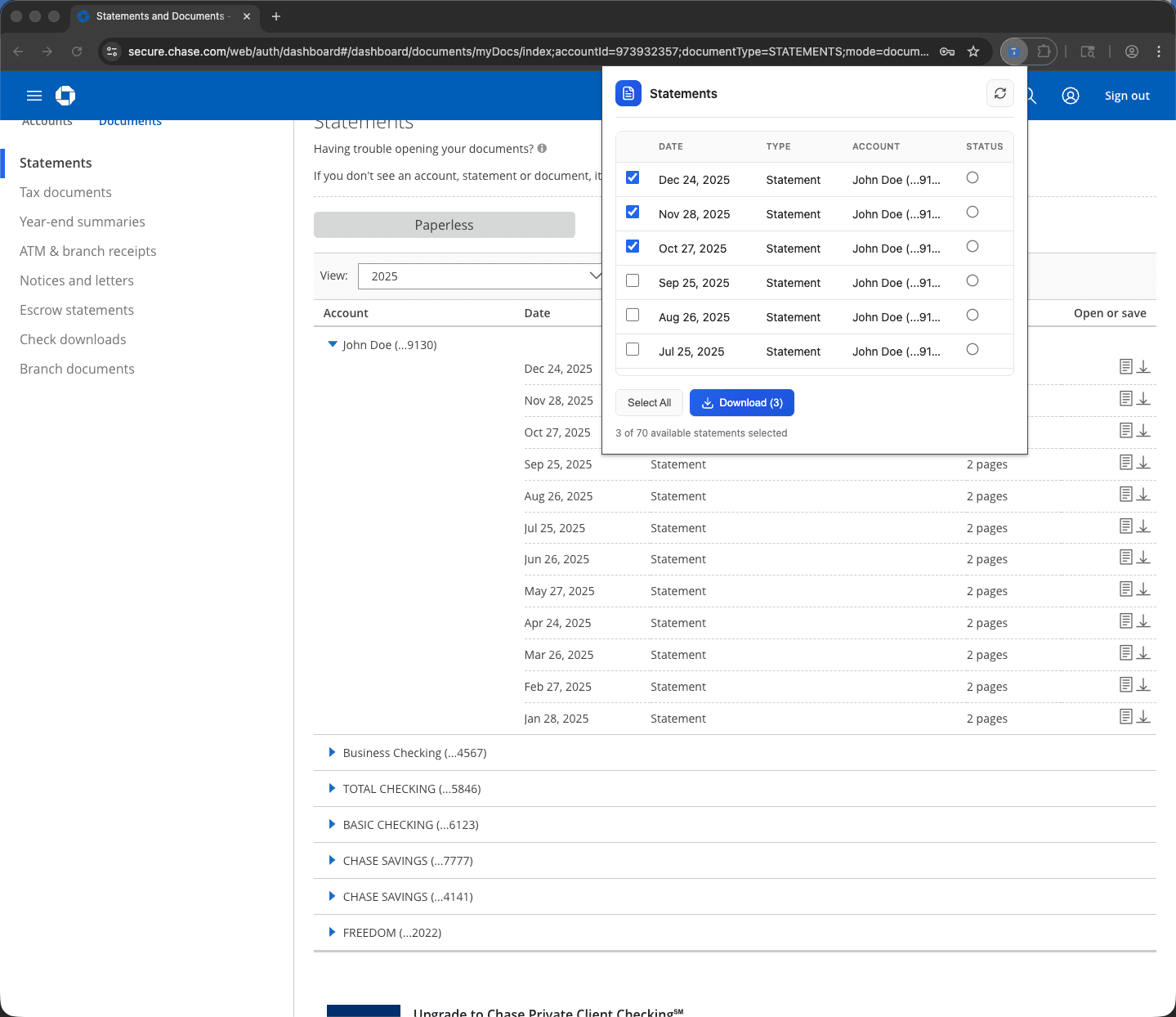
Select multiple statements with checkboxes
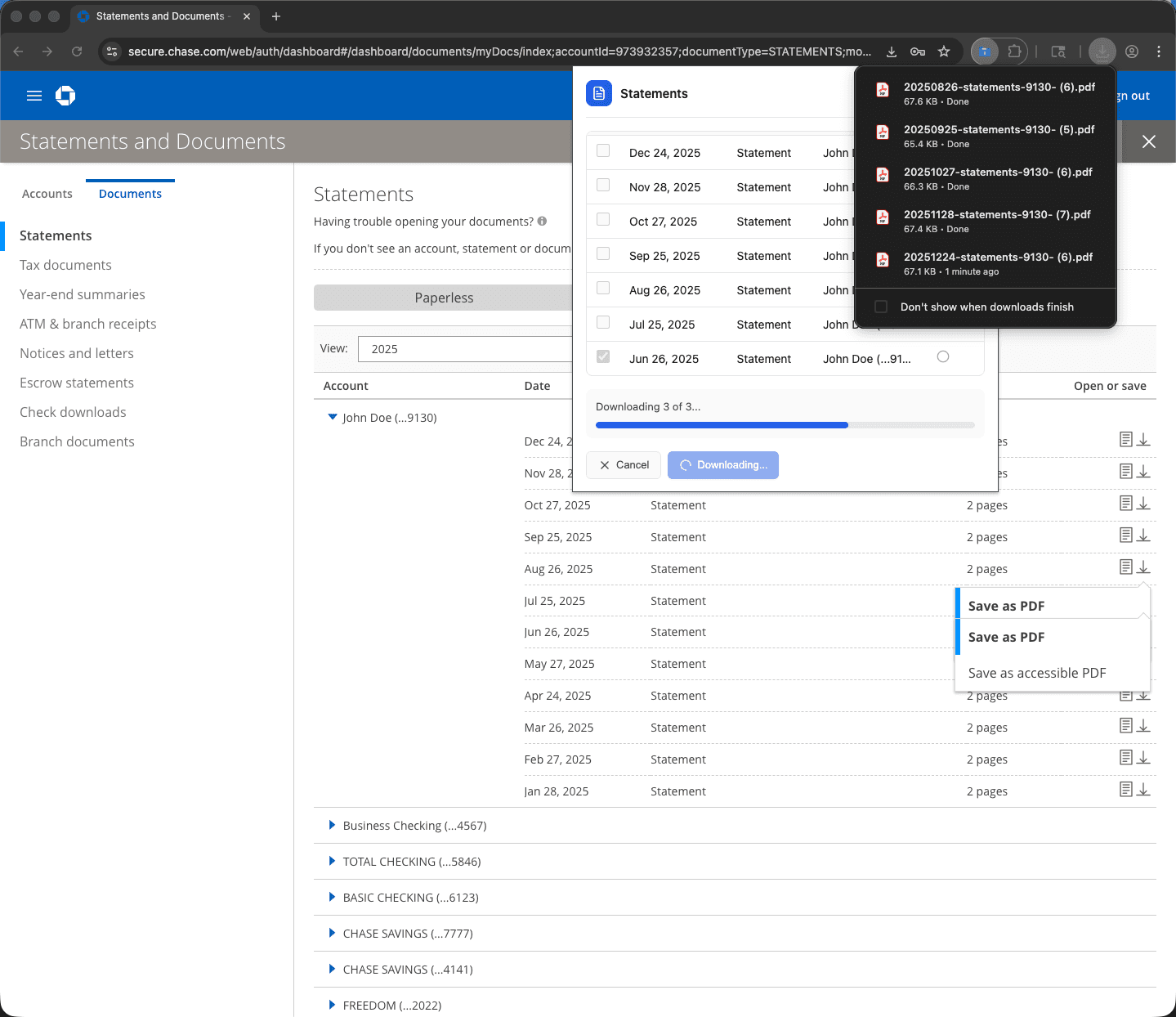
Track real-time download progress
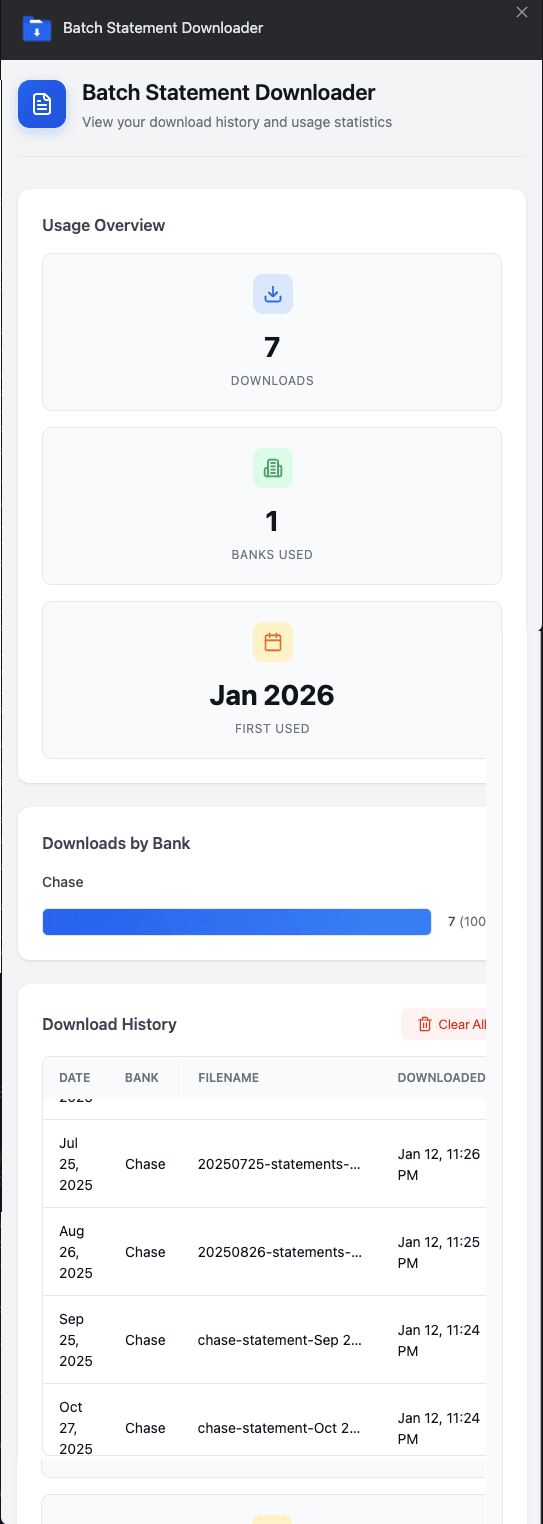
View your download history and stats
Core Features
Everything you need to manage your financial statements efficiently
Bulk Download Statements
Select multiple bank or credit card statements and download them all at once instead of clicking one by one.
Smart Detection
Automatically detects previously downloaded statements to prevent duplicates.
Progress Tracking
Watch your downloads complete in real time with clear status updates.
Privacy First
Works entirely in your browser. No accounts. No uploads. No access to your banking credentials.
Smarter Downloads in v1.2
Organize statements automatically so your files are clean, searchable, and ready for accounting.
Smart File Renaming
Automatically rename statements by bank, year, month, or custom format — no more "Statement (12).pdf".
Custom Naming Templates
Create your own filename structure for bookkeeping, accounting, or tax prep.
Rename Preview
See exactly how files will be named before downloading.
Download History
Track which statements you've already downloaded directly inside the extension.
Privacy & Security
Your financial data stays on your device. Always.
Works in your browser
All processing happens locally on your device. Nothing is sent to external servers.
No account required
Start using it immediately. No sign-up, no login, no tracking.
No financial data collected
We don't see, store, or transmit your statements or banking information.
Nothing uploaded
Your statements stay on your computer. They never leave your device.
No credential access
We don't have access to your banking username, password, or login details.
Local storage only
Download history is stored locally in Chrome storage on your device only.
Permissions Explained
Perfect For
Anyone who regularly downloads financial statements
Bookkeepers & Accountants
Download and organize client statements in minutes, not hours.
Small Business Owners
Keep financial records tax-ready with zero manual file renaming.
Landlords
Keep rental property documents tidy and searchable year-round.
Anyone Managing Finances
Turn hours of manual downloads into a single click.
Frequently Asked Questions
Everything you need to know about Batch Statement Downloader
Does it work on bank login pages?▼
Yes, it works after you log into your bank's official website. Navigate to the statements page, and the extension will detect available statements.
Where is my data stored?▼
All data stays on your device. Download history is stored locally in Chrome storage only. We never upload your statements or financial information.
What banks are supported today?▼
Currently supports Chase Bank, American Express, Discover Card, WEX Health / HSA Accounts, and Rocket Mortgage. More banks are coming soon!
Can I change the filename format?▼
Yes! Use Custom Naming Templates to create your own filename structure. Choose from bank name, year, month, and other variables to match your workflow.
How do I avoid duplicates?▼
Smart Detection automatically identifies statements you've already downloaded and warns you before re-downloading them.
Does this work in Incognito mode?▼
Chrome extensions are disabled in Incognito by default. You can enable it manually in Chrome extension settings if needed.
What if my bank changes their site?▼
We monitor for changes and update the extension regularly. If you notice it stops working, contact support@batchdownloader.com.
Does it work on business accounts?▼
Yes! It works on both personal and business accounts for supported banks.
Is this safe to use?▼
Absolutely. The extension works entirely in your browser, doesn't access your credentials, and never uploads your statements. Your data stays on your device.
How much does it cost?▼
It's completely free! Install from the Chrome Web Store and start using it immediately.
Does it work on Mac, Windows, and Linux?▼
Yes — it works on any operating system that runs Chrome desktop: macOS, Windows, and Linux.
How do I install it?▼
Install directly from the Chrome Web Store. No account, no sign-up required. Click "Add to Chrome" and it's ready to use on your next bank visit.
Can I download statements from multiple banks in the same session?▼
Yes. The extension works independently on each supported bank site. Visit each bank, download your statements, and all files will be consistently named regardless of which bank you're on.
What file format are the downloads?▼
Files are downloaded in whatever format the bank provides — typically PDF. The extension renames and organizes the files; it does not convert them.
What permissions does the extension require?▼
The extension requests access to supported bank websites only (Chase, American Express, Discover, WEX Health, Rocket Mortgage). It does not request access to all websites. No login credentials are accessed or stored.
Request Your Bank
Want us to support your bank? Request it below and we'll notify you when it's ready.
Ready to Organize Your Statements?
Join thousands of users who have automated their financial statement downloads.
Add to Chrome — Free✓ No account required • ✓ Works on official bank sites only • ✓ Nothing uploaded
Need Help?
We're here to help you get the most out of Batch Statement Downloader
📧 Email Support
Send us an email at support@batchdownloader.com
🏦 Currently Supported
- • Chase Bank (secure.chase.com)
- • American Express (Credit card and Loan statements)
- • Discover Card (Monthly statements)
- • WEX Health / HSA Accounts
- • Rocket Mortgage (Mortgage statements, tax forms, escrow documents)
More banks coming soon!